pdf2md에서와 마찬가지로 pptx2md에서
오픈소스 PPTX to Markdown 변환 도구를 비교해보고,
PPTX를 마크다운으로 변환시키는 과정에서 개선할 만한 부분을 알아보자.
오픈소스 PPTX to Markdown 변환 도구 비교
pdf2md에서의 도구였던, marker와 docling이 pptx2md를 하는 오픈소스 도구 중 하나다.
marker
import base64
import os
import tempfile
import traceback
from marker.logger import get_logger
from marker.providers.pdf import PdfProvider
logger = get_logger()
css = """
@page {
size: A4 landscape;
margin: 1.5cm;
}
table {
width: 100%;
border-collapse: collapse;
break-inside: auto;
font-size: 10pt;
}
tr {
break-inside: avoid;
page-break-inside: avoid;
}
td {
border: 0.75pt solid #000;
padding: 6pt;
}
img {
max-width: 100%;
height: auto;
object-fit: contain;
}
"""
class PowerPointProvider(PdfProvider):
include_slide_number: bool = False
def __init__(self, filepath: str, config=None):
temp_pdf = tempfile.NamedTemporaryFile(delete=False, suffix=".pdf")
self.temp_pdf_path = temp_pdf.name
temp_pdf.close()
# Convert PPTX to PDF
try:
self.convert_pptx_to_pdf(filepath)
except Exception as e:
print(traceback.format_exc())
raise ValueError(f"Error converting PPTX to PDF: {e}")
# Initalize the PDF provider with the temp pdf path
super().__init__(self.temp_pdf_path, config)
def __del__(self):
if os.path.exists(self.temp_pdf_path):
os.remove(self.temp_pdf_path)
def convert_pptx_to_pdf(self, filepath):
from weasyprint import CSS, HTML
from pptx import Presentation
from pptx.enum.shapes import MSO_SHAPE_TYPE
pptx = Presentation(filepath)
html_parts = []
for slide_index, slide in enumerate(pptx.slides):
html_parts.append("<section>")
if self.include_slide_number:
html_parts.append(f"<h2>Slide {slide_index + 1}</h2>")
# Process shapes in the slide
for shape in slide.shapes:
# If shape is a group shape, we recursively handle all grouped shapes
if shape.shape_type == MSO_SHAPE_TYPE.GROUP:
html_parts.append(self._handle_group(shape))
continue
# If shape is a table
if shape.has_table:
html_parts.append(self._handle_table(shape))
continue
# If shape is a picture
if shape.shape_type == MSO_SHAPE_TYPE.PICTURE:
html_parts.append(self._handle_image(shape))
continue
# If shape has text
if hasattr(shape, "text") and shape.text is not None:
if shape.has_text_frame:
# Distinguish placeholders (title, subtitle, etc.)
html_parts.append(self._handle_text(shape))
else:
html_parts.append(f"<p>{self._escape_html(shape.text)}</p>")
html_parts.append("</section>")
html = "\n".join(html_parts)
# We convert the HTML into a PDF
HTML(string=html).write_pdf(
self.temp_pdf_path, stylesheets=[CSS(string=css), self.get_font_css()]
)
def _handle_group(self, group_shape) -> str:
"""
Recursively handle shapes in a group. Returns HTML string for the entire group.
"""
from pptx.enum.shapes import MSO_SHAPE_TYPE
group_parts = []
for shape in group_shape.shapes:
if shape.shape_type == MSO_SHAPE_TYPE.GROUP:
group_parts.append(self._handle_group(shape))
continue
if shape.has_table:
group_parts.append(self._handle_table(shape))
continue
if shape.shape_type == MSO_SHAPE_TYPE.PICTURE:
group_parts.append(self._handle_image(shape))
continue
if hasattr(shape, "text"):
if shape.has_text_frame:
group_parts.append(self._handle_text(shape))
else:
group_parts.append(f"<p>{self._escape_html(shape.text)}</p>")
return "".join(group_parts)
def _handle_text(self, shape) -> str:
"""
Processes shape text, including bullet/numbered list detection and placeholders
(title, subtitle, etc.). Returns HTML for the text block(s).
"""
from pptx.enum.shapes import PP_PLACEHOLDER
# Distinguish placeholders to see if it's a title or subtitle
label_html_tag = "p"
if shape.is_placeholder:
placeholder_type = shape.placeholder_format.type
if placeholder_type in [PP_PLACEHOLDER.TITLE, PP_PLACEHOLDER.CENTER_TITLE]:
label_html_tag = "h3"
elif placeholder_type == PP_PLACEHOLDER.SUBTITLE:
label_html_tag = "h4"
# Keep track of whether we are currently in a <ul> or <ol>
html_parts = []
list_open = False
list_type = None # "ul" or "ol"
for paragraph in shape.text_frame.paragraphs:
p_el = paragraph._element
# Check bullet
bullet_char = p_el.find(".//a:buChar", namespaces=p_el.nsmap)
bullet_num = p_el.find(".//a:buAutoNum", namespaces=p_el.nsmap)
is_bullet = (bullet_char is not None) or (paragraph.level > 0)
is_numbered = bullet_num is not None
# If the paragraph is bullet or numbered
if is_bullet or is_numbered:
# Decide if we need to start a new list or continue an existing one
current_list_type = "ol" if is_numbered else "ul"
if not list_open:
# Start new
list_open = True
list_type = current_list_type
html_parts.append(f"<{list_type}>")
elif list_open and list_type != current_list_type:
# Close old list, start new
html_parts.append(f"</{list_type}>")
list_type = current_list_type
html_parts.append(f"<{list_type}>")
# Build the bullet (li) text from all runs in the paragraph
p_text = "".join(run.text for run in paragraph.runs)
if p_text:
html_parts.append(f"<li>{self._escape_html(p_text)}</li>")
else:
# If we were in a list, we need to close it
if list_open:
html_parts.append(f"</{list_type}>")
list_open = False
list_type = None
# Now it's just a normal paragraph
# Gather the paragraph text from runs
p_text = "".join(run.text for run in paragraph.runs)
if p_text:
# If we know it's a slide title, we can use <h3> or so
html_parts.append(
f"<{label_html_tag}>{self._escape_html(p_text)}</{label_html_tag}>"
)
# If the text frame ended and we still have an open list, close it
if list_open:
html_parts.append(f"</{list_type}>")
return "".join(html_parts)
def _handle_image(self, shape) -> str:
"""
Embeds the image as a base64 <img> in HTML.
"""
image = shape.image
image_bytes = image.blob
try:
img_str = base64.b64encode(image_bytes).decode("utf-8")
return f"<img src='data:{image.content_type};base64,{img_str}' />"
except Exception as e:
logger.warning(f"Warning: image cannot be loaded by Pillow: {e}")
return ""
def _handle_table(self, shape) -> str:
"""
Renders a shape's table as an HTML <table>.
"""
table_html = []
table_html.append("<table border='1'>")
for row in shape.table.rows:
row_html = ["<tr>"]
for cell in row.cells:
row_html.append(f"<td>{self._escape_html(cell.text)}</td>")
row_html.append("</tr>")
table_html.append("".join(row_html))
table_html.append("</table>")
return "".join(table_html)
def _escape_html(self, text: str) -> str:
"""
Minimal escaping for HTML special characters.
"""
return (
text.replace("&", "&")
.replace("<", "<")
.replace(">", ">")
.replace('"', """)
.replace("'", "'")
)
기존 PdfProvider에서의 로직을 그대로 쓰길 원해서 이렇게 구현한 것인지,
PPTX -> HTML 문자열 -> PDF -> 공통 PDF 파이프라인(pdf2md) 를 거치도록 되어 있다.
위 코드는 슬라이드에서 다음 pptx 내용들을 html로 바꾸고, html을 pdf로 바꾼다.
- 텍스트(문단/불릿/번호/제목·부제목 placeholder)
- 표
- 그림(이미지)
- 그룹 도형(내부를 재귀적으로 위 3가지로 분해)
docling
class PowerpointFormatOption(FormatOption):
    pipeline_cls: Type = SimplePipeline
    backend: Type[AbstractDocumentBackend] = MsPowerpointDocumentBackend
MsPowerpointDocumentBackend로 pptx를 읽고, SimplePipeline을 거치도록 되어 있다.
DoclingDocument
class DoclingDocument(BaseModel):
    """DoclingDocument."""

    schema_name: typing.Literal["DoclingDocument"] = "DoclingDocument"
    version: Annotated[str, StringConstraints(pattern=VERSION_PATTERN, strict=True)] = CURRENT_VERSION
    name: str  # The working name of this document, without extensions
    # (could be taken from originating doc, or just "Untitled 1")
    origin: Optional[DocumentOrigin] = (
        None  # DoclingDocuments may specify an origin (converted to DoclingDocument).
        # This is optional, e.g. a DoclingDocument could also be entirely
        # generated from synthetic data.
    )

    furniture: Annotated[GroupItem, Field(deprecated=True)] = GroupItem(
        name="_root_",
        self_ref="#/furniture",
        content_layer=ContentLayer.FURNITURE,
    )  # List[RefItem] = []
    body: GroupItem = GroupItem(name="_root_", self_ref="#/body")  # List[RefItem] = []

    groups: list[Union[ListGroup, InlineGroup, GroupItem]] = []
    texts: list[Union[TitleItem, SectionHeaderItem, ListItem, CodeItem, FormulaItem, TextItem]] = []
    pictures: list[PictureItem] = []
    tables: list[TableItem] = []
    key_value_items: list[KeyValueItem] = []
    form_items: list[FormItem] = []

    pages: dict[int, PageItem] = {}  # empty as default
    ...
    ...
    ...
전체 내용은 DoclingDocument 참고. docling에선 backend에서 파일을 읽어서 DoclingDocument로 내부에서 다룬다.
unified document representation format called
DoclingDocument. It is defined as a pydantic datatype, which can express several features common to documents, such as:
- Text, Tables, Pictures, and more
- Document hierarchy with sections and groups
- Disambiguation between main body and headers, footers (furniture)
- Layout information (i.e. bounding boxes) for all items, if available
- Provenance information
MsPowerpointDocumentBackend
	...
	...
    @override
    def convert(self) -> DoclingDocument:
        """Parse the PPTX into a structured document model.

        Returns:
            The parsed document.
        """
        origin = DocumentOrigin(
            filename=self.file.name or "file",
            mimetype="application/vnd.ms-powerpoint",
            binary_hash=self.document_hash,
        )

        doc = DoclingDocument(name=self.file.stem or "file", origin=origin)
        if self.pptx_obj:
            doc = self._walk_linear(self.pptx_obj, doc)

        return doc
    ...
    ...
    ...
    def _walk_linear(
        self, pptx_obj: presentation.Presentation, doc: DoclingDocument
    ) -> DoclingDocument:
        # Units of size in PPTX by default are EMU units (English Metric Units)
        slide_width = pptx_obj.slide_width
        slide_height = pptx_obj.slide_height

        max_levels = 10
        parents = {}  # type: ignore
        for i in range(max_levels):
            parents[i] = None

        # Loop through each slide
        for _, slide in enumerate(pptx_obj.slides):
            slide_ind = pptx_obj.slides.index(slide)
            parent_slide = doc.add_group(
                name=f"slide-{slide_ind}", label=GroupLabel.CHAPTER, parent=parents[0]
            )

            slide_size = Size(width=slide_width, height=slide_height)
            doc.add_page(page_no=slide_ind + 1, size=slide_size)

            def handle_shapes(shape, parent_slide, slide_ind, doc, slide_size):
                handle_groups(shape, parent_slide, slide_ind, doc, slide_size)
                if shape.has_table:
                    # Handle Tables
                    self._handle_tables(shape, parent_slide, slide_ind, doc, slide_size)
                if shape.shape_type == MSO_SHAPE_TYPE.PICTURE:
                    # Handle Pictures
                    if hasattr(shape, "image"):
                        self._handle_pictures(
                            shape, parent_slide, slide_ind, doc, slide_size
                        )
                # If shape doesn't have any text, move on to the next shape
                if not hasattr(shape, "text"):
                    return
                if shape.text is None:
                    return
                if len(shape.text.strip()) == 0:
                    return
                if not shape.has_text_frame:
                    _log.warning("Warning: shape has text but not text_frame")
                    return
                # Handle other text elements, including lists (bullet lists, numbered
                # lists)
                self._handle_text_elements(
                    shape, parent_slide, slide_ind, doc, slide_size
                )
                return

            def handle_groups(shape, parent_slide, slide_ind, doc, slide_size):
                if shape.shape_type == MSO_SHAPE_TYPE.GROUP:
                    for groupedshape in shape.shapes:
                        handle_shapes(
                            groupedshape, parent_slide, slide_ind, doc, slide_size
                        )

            # Loop through each shape in the slide
            for shape in slide.shapes:
                handle_shapes(shape, parent_slide, slide_ind, doc, slide_size)

            # Handle notes slide
            if slide.has_notes_slide:
                notes_slide = slide.notes_slide
                if notes_slide.notes_text_frame is not None:
                    notes_text = notes_slide.notes_text_frame.text.strip()
                    if notes_text:
                        bbox = BoundingBox(l=0, t=0, r=0, b=0)
                        prov = ProvenanceItem(
                            page_no=slide_ind + 1,
                            charspan=[0, len(notes_text)],
                            bbox=bbox,
                        )
                        doc.add_text(
                            label=DocItemLabel.TEXT,
                            parent=parent_slide,
                            text=notes_text,
                            prov=prov,
                            content_layer=ContentLayer.FURNITURE,
                        )

        return doc
pptx파일을 읽는 것 자체는 위 marker와 상당히 유사하다.
python-pptx를 이용해서 내용을 읽고, 그것을 슬라이드 단위로 순회해서 DoclingDocument로 옮긴다.
결과적으로 얻는 것은, 각 슬라이드에서:
- 텍스트(문단/리스트/제목 계열)
- 표
- 그림
- 노트 텍스트(발표자 노트(speaker notes))
이다.
SimplePipeline
import logging

from docling.backend.abstract_backend import (
    AbstractDocumentBackend,
    DeclarativeDocumentBackend,
)
from docling.datamodel.base_models import ConversionStatus
from docling.datamodel.document import ConversionResult
from docling.datamodel.pipeline_options import ConvertPipelineOptions
from docling.pipeline.base_pipeline import ConvertPipeline
from docling.utils.profiling import ProfilingScope, TimeRecorder

_log = logging.getLogger(__name__)


class SimplePipeline(ConvertPipeline):
    """SimpleModelPipeline.

    This class is used at the moment for formats / backends
    which produce straight DoclingDocument output.
    """

    def __init__(self, pipeline_options: ConvertPipelineOptions):
        super().__init__(pipeline_options)

    def _build_document(self, conv_res: ConversionResult) -> ConversionResult:
        if not isinstance(conv_res.input._backend, DeclarativeDocumentBackend):
            raise RuntimeError(
                f"The selected backend {type(conv_res.input._backend).__name__} for {conv_res.input.file} is not a declarative backend. "
                f"Can not convert this with simple pipeline. "
                f"Please check your format configuration on DocumentConverter."
            )
            # conv_res.status = ConversionStatus.FAILURE
            # return conv_res

        # Instead of running a page-level pipeline to build up the document structure,
        # the backend is expected to be of type DeclarativeDocumentBackend, which can output
        # a DoclingDocument straight.
        with TimeRecorder(conv_res, "doc_build", scope=ProfilingScope.DOCUMENT):
            conv_res.document = conv_res.input._backend.convert()
        return conv_res

    def _determine_status(self, conv_res: ConversionResult) -> ConversionStatus:
        # This is called only if the previous steps didn't raise.
        # Since we don't have anything else to evaluate, we can
        # safely return SUCCESS.
        return ConversionStatus.SUCCESS

    @classmethod
    def get_default_options(cls) -> ConvertPipelineOptions:
        return ConvertPipelineOptions()

    @classmethod
    def is_backend_supported(cls, backend: AbstractDocumentBackend):
        return isinstance(backend, DeclarativeDocumentBackend)
pdf의 경우(OCR/layout/table/assemble/reading-order … )랑 다르게 상당히 별 내용이 없다.
결론
정리
pptx도 입력으로 받을 수 있는 정보는 다음과 같을 것이다.
파일 구조로부터 얻을 수 있는 정보(파싱해서 얻을 수 있는 정보)와시각적 요소로부터 얻을 수 있는 정보(렌더링한 이미지를 이용해서 얻을 수 있는 정보)하지만 pptx를 파싱해서 얻는 정보로 충분하다고 판단해서인지, marker와 docling 모두 파싱 정보만을 이용하는 모습이다.
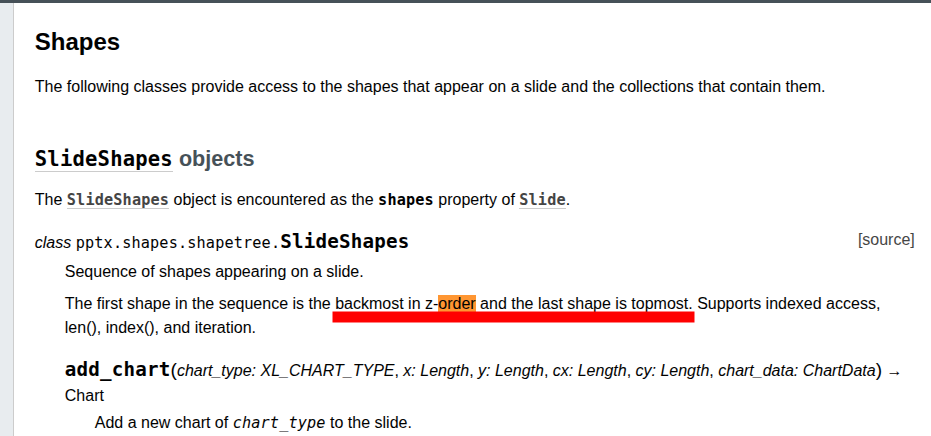
여기서 읽기 순서는 python-pptx가 주는 컬렉션순서(backmost in z-order and the last shape is topmost)를 그대로 따르고 있다. pptx 문서 작성 시의 순서(+ 도형 앞으로 보내기 / 뒤로 보내기)가 상당히 중요하게 작용할 것 같다. # PresentationML Slides - Content - Shape Tree - The first shape in the tree has the lowest z-order and the last shape has the highest. ⇒ 렌더링 한 다음 reading-order 모델 이용 고려 or 좌표 정보 이용